To run a computer smoothly processor should be in good condition and well maintained. Liquid cooling is the answer to cool the hot CPU. It is much more efficient because of its two advantages, one is it allows higher clock speeds in the processor, second it reduces noise.
But, what is Liquid Cooling?
Liquid cooling is mainly a radiator for the Central Processing Unit inside the computer. The liquid cooling system circulates a liquid through a heat sink attached to the processor. As the liquid passes through the sink, heat is transferred from the hot processor to the cooler liquid. The hot liquid then moves out to a radiator and the heat is expelled to the air outside and the cooled liquid is sent back to the CPU through the liquid cooling system.
Advantages of Liquid Cooling
1. As the temperatures are within the permissible limits of the manufacturer's specifications, the PC clocks speeds are higher.
2. Liquid Cooling Solution gives much less noise than the heat sink and fan combination type.
Disadvantages of Liquid Cooling
There are a large no. of disadvantages in liquid cooling mainly because of size and technical skills needed to install it.
It requires a large space. Enough space must be there for the fluid reservoir, the impeller, the tubing, fan and power supplies.
Opt for Liquid Cooling or Not
Since it is relatively a new technology to PC, high technical knowledge to install is required and requires large space, presently it is not suitable for general computers.
But if CPU speed continues to increase and new heat control systems are discovered with regard to processors, liquid cooling may become a standard computer system construction. Also people are more sensitive towards noise these days and slowly may look for the lesser noise option.

Technology has made possible almost everything. I changed all my old audio cassettes to mp3 in the method below. Have a look and try it.
1. Connect one end of normal stereo in/out cable to your computer's line-in terminal with a 1/8" mini-jack and the other end to player's stereo out (headphone socket).
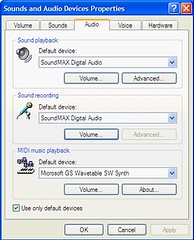
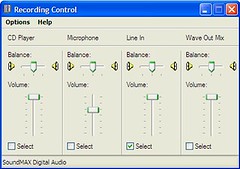
2. Change the recording control of your PC to Rear input/Line in. You can do this by going to "Sounds and audio device properties" in the Control Panel. Then you have to click the audio tab and volume button in Sound Recording as shown in picture below.
In Sound and Audio Properties, change recording control to "Rear input/Line In".
Set audio format at 44.1 kHz in Windows by going to Program/Accessories/Entertainment/Sound Recorder.
3. Now play the music on your cassette player and start recording via the sound recorder, or other free sound recorders/encoders like Jet Audio Basic, Media Jukebox or Audacity.
Windows sound recorder will record the music only in WAV format. You can change it to MP3 later by using any free encoders available online.
You can listen to music simultaneously while it's recording through your computer speakers or headphones.
If you have to record multiple songs, split your recording into seperate files.
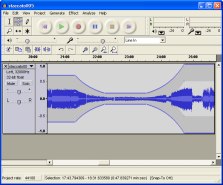
If you are using Audacity (see picture below), a free downloadable digital audio editor application, recording should be set for 2 channels (stereo) and the playback and recording devices set to built-in audio controller. Keep audio format for recording at 44.1 kHz, 16 bit stereo. This is the standard format for CD audio quality.
Do not change the volume of your cassettes during recording. Avoid playing it at full volume.
You can download some of the encoders.
Audacity, the free cross-platform sound editor
Download Audacity 1.2.6
Download Media JukeBox
Most popular Jukebox downloads